Friday, October 22, 2010

Review: Flip-Pal Mobile Scanner - Part 2

It's easy to say that the Flip-Pal mobile scanner is going to meet my expectations for a versatile portable scanning device. Part 1 of this review demonstrated the scanning, color correction and stitching features.

You absolutely cannot beat this device based on its size and weight, which make it extremely portable. To get an idea of its size, below is my netbook computer and on the right is the Flip-Pal scanner.


Both devices could easily fit in the carrying case for my netbook, however, there may be times when I only need to use the scanner. So I stopped by Staples today and found a carrying case that is perfect for the scanner and has plenty of room for extra batteries. And from what I read in the user's manual, this scanner will definitely use plenty of batteries.

One of the selling points of the Flip-Pal scanner is that it can be used without a computer! No cords, no wires. Just grab and go. This makes the Flip-Pal a great device for genealogists. Take it to family reunions when people bring their family photos and albums. Take it on research trips to scan those photos that relatives don't want to turn loose. Use it in research facilities to scan documents or pages from a book (with proper copyright usage, of course!). If there's a wonderful document or photograph that is in the custody of one family member, having a digital scan is the best way to share it with other members of the family. And size no longer matters. Theoretically, you could scan and digitally stitch together a wall mural with this device if you wanted to.


All of the scanning is done right on the Flip-Pal. The scans are saved to a SD memory card. You will have to take the memory card to your computer to do any photo editing and stitching. The scanner comes with a SD to USB adaptor, so if your computer doesn't accept SD cards, it doesn't matter.

The software runs off the SD card and the product manual is also on the SD card. The manual is 18 pages in an Adobe pdf file. I seldom read a product manual - I just start clicking buttons. I did, however, check the manual to see how to remove the cover since I didn't want to break it and wanted to try the Flip part of the scanner. I did read about the batteries and like other digital devices, this is a battery hog. The unit requires four AA batteries (stock up on those today, too). The manual indicates that the scanner will yield about 150 scans on alkaline batteries, about 450 on photo lithium, and about 120 on rechargeable NiMH.

Scanning options are either 300 dpi or 600 dpi. The SD card that comes with the unit has about 1.5 GB available for storing images, which the manual indicates is about 750 scans at 300 dpi or 375 scans at 600 dpi. You can also use any standard SD or SDHC memory card, so if the 2 GB that comes with the unit is not enough, use your 4 GB or 8 GB cards. The toolbox software can be copied onto your own SD card.

If you purchase the Flip-Pal, plan on another $10 - $20 for a netbook sleeve or carrying case. The unit could probably be easily scratched or damaged if you just carry it around without any kind of protective cover.

Plan on stocking up on batteries or get that recharger out. If you're doing a lot of scanning, you'll be going through a lot.

Overall, the positive features of the Flip-Pal far outweigh any drawbacks. It's portable, it's lightweight and versatile. You can scan anywhere - on the kitchen table, at a family picnic, even sitting in bed while watching TV.

The Flip-Pal web site

Disclaimer: I purchased this product directly from the Flip-Pal web site. No compensation of any kind was received for this review.

Review: Flip-Pal Mobile Scanner - Miracles in Minutes - Part 1

I've eagerly been waiting for my Flip-Pal mobile scanner to arrive ever since I ordered it in August. This little gem arrived yesterday and I've been trying out some basic scanning as well as scanning an oversized document to see how the Autostitch software works.

I was scanning some 55 year old snapshots in less than five minutes after opening the box.

First of all, this scanner is fast. I'm used to my flatbed scanner warming up, grinding around taking its sweet time. This scanner was producing images for me in just a few seconds.

Apparently I was pissed off about something!
To the left is just a very ordinary photo of yours truly mugging for the camera. It's fairly typical of Brownie camera photographs processed at the drugstore in the mid-1950s. With some minor adjustments in the contrast, the scan actually looks sharper than the original.


The software that comes with the scanner allows you to make some adjustments with brightness and contrast. I found it to be quite satisfactory for these "quick and dirty" examples. If you want to do more photo restoration in Photoshop or other photo editing software, that would be fine. But for most scans, I think the Flip-Pal software is totally acceptable.


Below is a Before and After example of the type of adjustments you can make on your scanned images. On the left is my original scan and on the right is after I experimented with the brightness and contrast. The original image is one of those small Photo Booth pictures, circa 1940.


The next project was to see just how this works on oversize images. After all, isn't that the reason that a lot of we genealogists are interested in this product?

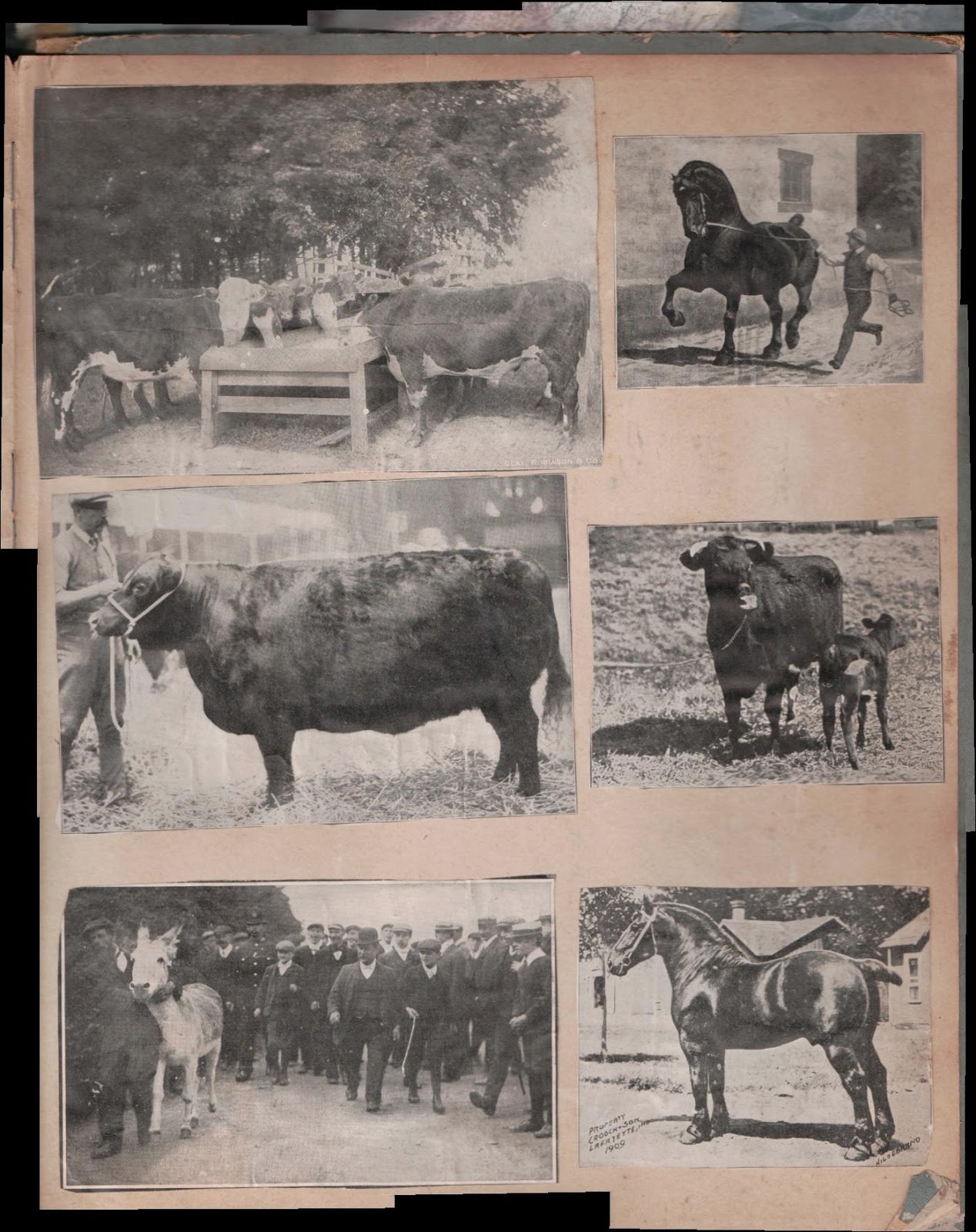
I went straight for my grandfather's childhood scrapbook of magazine photos of horses, cows and pigs. It's about 12" x 14" - maybe even larger. But it's too big to get a full page on my flatbed scanner. It took me a couple tries to get the auto-stitching software to work, but that was my own fault since I seldom read an instruction manual unless absolutely necessary. Since the software was not recognizing any stitchable regions, I realized that my scans had to overlap with one another. I made 11 scans of the page and here are four of them, just to demonstrate what the individual scanned images look like. Image size is reduced for the blog post.

Funny caption, anyone?


The Flip-Pal software is loaded on the 2GB SD memory card that comes installed on the scanner.


I clicked on the menu item "Stitch Scans", selected the scanned images to sew together and in only a few seconds, I had the following image on my computer screen:


I've left this image at its original size so you can click on it to see the full-size Hi-Res scan. I'll challenge anyone to find each individual scanned image. It absolutely matches perfectly. I even avoided cropping this image so you could seen the overage on the sides where I did the scanning. Well, what can I say? This is one of the two main reasons that I wanted to get this scanner.

Part 2 of this review will focus more on the technical aspects of the product and reason number 2 for my purchase - portability.

The Flip-Pal website

Part 2 of this review

Disclaimer: I purchased this product directly from the Flip-Pal web site. No compensation of any kind was received for this review.

Follow Friday: Around the Blogosphere - Oct 22

Here are my favorite posts from fellow bloggers from the past week:

Nebraska The Heartland - Irish folk singer Ken O'Malley blogs about his tour of Nebraska this week

Graveyard Humor - strange tombstones from Grave Humor

Top Ten Considerations for Donating Your Family Papers by Sassy Jane

Family Search Beta Has a New Look - by Randy Seaver, Geneamusings

Fun at the California Family History Expo - Thomas MacEntee of Destination Austin Family

Ancestry's Relationship Calculator from Dear Myrtle

Wednesday, October 20, 2010

Wedding Wednesday: Jens Christian Petersen and Caroline Hansen

Jens and Caroline Petersen
December 10, 1892
Black Hawk county, Iowa
My father's grandparents were both born in Denmark and both came to the United States in 1888. Jens arrived with his parents, Peder and Elsia Jeremiasen. The Jeremiasen family's destination was Waterloo, Iowa. Jens and his siblings were listed with the surname Jeremiasen on ship's passenger list. In America, Peder retained the surname Jeremiasen, but all of Peder and Elsia's children took the surname Petersen. Once in America, my Danish ancestors stopped changing the surname with each generation.

I've not yet documented Caroline's arrival in America. Family lore was that she and Jens met on the ship. If that is the case, there is only one possible entry on the ship's passenger list that could be Caroline, a 16 year old female who was unnamed, but listed as Servant with another passenger.

It was just a few weeks ago when I discovered documentation of Jens and Caroline's marriage on FamilySearch.org. Their union is listed in the collection of Iowa Marriages, 1809 - 1992. This record shows that Elsia's maiden name was Lauridsen, not Polsdatter as I had been told by other family members and as was recorded in Jens' obituary. Jens' obituary also reports the family moving to Nebraska from Iowa about ten years before they actually moved. The Petersens moved to Nuckolls county Nebraska about 1905, between the births of two of their children.

On the marriage record, Caroline's parents are listed as Soren Hansen and Christine Nielsen.

The Family Search record shows that Jens and Caroline were married in Black Hawk county, Iowa. The wedding location may have been Cedar Falls, Iowa (that is from my notes from another family member). Cedar Falls is about ten miles from Waterloo, Iowa where the newlyweds lived.

Jens and Caroline Petersen
Hardy, Nebraska
Jens and Caroline were the parents of ten children: Emma Christine, Elmer Martinus, Otto William, Katherine Jereminia, John Theodore, Christine Dorothea (died as an infant), Esther Dorthea, Marvin, Margaret Leona, and Jess Carl.

Jens died in Hardy, Nebraska on August 9, 1948 and Caroline died January 7, 1962. Caroline's grave marker shows the original spelling of her name: Karoline.

Tuesday, October 19, 2010

Tuesday's Tip: Making Music part of your family history

Everyone loves music. So did our ancestors.

While putting your family's story into historical context, consider taking a look at the music that was popular during their lives. Top 40 or the Hit Parade - whatever it may have been in their time - can help bring the stories about your ancestors to life.

An excellent resource to look into musical heritage is the New York Public Library's digital archives. A fun place to start is with the sheet music covers of American popular song from 1890-1922. You can browse the collection by year or do a search of the collection.

My fellow fans of Dancing With the Stars might enjoy seeing the sheet music for the Argentine Tango (1912). Another selection from 1912 was It's a Long Long Way to Tipperary. World War II brings us songs such as Those Draft-in Blues. With the war over, the Roaring Twenties include such hits as Ain't We Got Fun.

All categories of digital images about music in this archive are listed here.

Music has always been a big part of my life. Anytime I hear songs from the 1960s, I usually always associate the song with what was happening in my life at the time. The same thing was probably true of our ancestors.

Just for fun, a related book: On This Day in Music History: Over 2,000 Popular Music Facts Covering Every Day of the Year (Book)